I’m sure most IT professionals have heard “it’s a feature, not a bug” before. Some have even heard “it’s a bug, not a feature”; usually followed by a request to re-enable the bug because their workflow broke. This is a story about the latter; in which a vendor (1) introduced a new bug in an upgrade, (2) claimed it was the fix for a bug some other customer had, and (3) sent a quote for fixing their regression.
The application was called OR Manager, and it was deployed at the hospital where I was working at the time. After a major version upgrade, it began exhibiting strange behaviour: users would open a record for editing, and by the time they completed their edits and attempted to save the record, they were informed said record was now locked. Even stranger, the user locking the record was always themselves.
Discovering the Cause
The issue only manifested on VDI PCs. At the time, Omnissa Horizon1 with linked clones was used to provide VDI services. This meant that each user received an ephemeral PC for the duration of their session. It was theirs, and theirs alone. VM hostnames could be reused, which was considered as a possible cause.
OR Manager implemented distributed locking via a SQL table. The table identified locks using two columns in combination: username and hostname2. A (simplified) example is shown below.
| username | hostname | object_id | locked_since |
|---|---|---|---|
| mmcfly | or-1 | 5612f9e2c888 | 1985-10-25T08:25:00-07:00 |
| ebrown | or-2 | 5378d1b38efb | 1985-10-25T08:18:00-07:00 |
| btannen | maindesk | b65406a3af71 | 1985-10-26T01:16:00-07:00 |
| jparker | or-7 | 676efc3bfdcb | 1985-10-26T01:18:00-07:00 |
A pattern emerged when checking the records that corresponded to users who experience the locking issue: the hostname column didn’t contain the hostname of their PC. Instead, it contained the hostname of the VDI zero client that was connected at the time the lock was issued. At this point, a narrative of the issue could be constructed:
- User
ebrownstarts a new VDI session. The VM’s Windows hostname isVM-6785, and the zero client’s hostname isor-2. - User
ebrownopens object5378d1b38efbfor editing. OR Manager issues a lock forebrownonor-2. - User
ebrowndisconnects their VM from zero clientor-2and reconnects their VM at zero clientmaindesk. - User
ebrownattempts to save object5378d1b38efb. OR Manager denies this, because the lock is held byebrownonor-1, notebrownonmaindesk.
Omnissa Horizon does pass the currently connected zero client hostname into the VM via an environment variable, but it doesn’t try to inject this into processes or otherwise overwrite the hostname. Since this issue coincided with a major version upgrade, it was clear this behaviour change was tied to a code change in OR Manager. At this point, it was time to call the vendor and report a bug.
Stuff Vendors Say
The vendor (PICIS) returned with a completely reasonable fix: just tell users not to leave OR Manager open when roaming between thin clients. Never mind that this was completely OK in a previous version (8.4). The release notes for the new version (8.6) helpfully confirmed that this functionality was introduced as a fix for a “defect”.
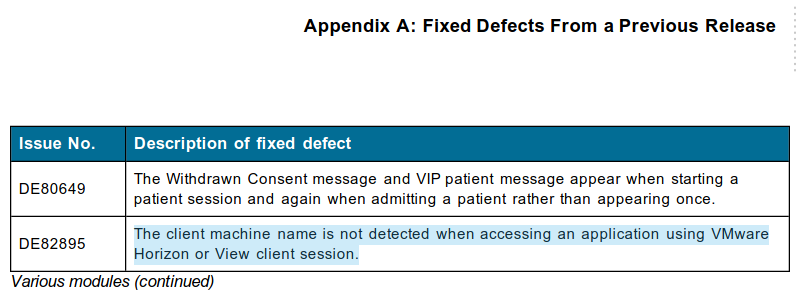
After some back and forth over email, it became clear that the best fix was to restore the old, pre-8.6 behaviour. There was just one issue: PICIS wanted to treat this as an enhancement request, not a defect to be fixed. This was unusual, as it’s clear the faulty behaviour was introduced to fix a defect. Treating it as an enhancement request meant that fixing it was billable. I can’t recall the exact amount, but it was several thousand dollars we shouldn’t have to spend. I got on a call with their support manager and their sales manager to get some clarity on their stance. This was nearly a decade ago, and I don’t have the recordings of the call (I really wish I did), but to summarize:
- The defect was reported by a very large healthcare organization in the US.
- They had deployed Omnissa Horizon in such a manner that VDI VMs didn’t roam between zero clients (likely application publishing/RDSH)
- They had not been charged for developing the fix, as PICIS treated it as a defect.
When the support manager told us the original defect had been fixed without a cost, the sales manager was very quick to try to take the remaining discussion offline. Nothing came of it, but our side of the call felt pretty good having caught them in their contradiction.
The vendor clearly wasn’t going to be any help - so, how did it get fixed?
Identifying Incorrect Behaviour
Omnissa Horizon exposes the zero client’s hostname via an environment variable, called ViewClient_MachineName. Knowing, for a certainty, that code to read ViewClient_MachineName was present somewhere in OR Manager’s codebase, I searched for the responsible executable or library using strings. This turned up two files: a .NET DLL, and a PowerBuilder library. Decompiling the .NET library revealed the following function (translated from IL):
public string
This code, however, could not be the code responsible for reporting the hostname for the purposes of locking, for two reasons:
- The code caches the hostname in
this._machineName; it would remain fixed throughout the lifespan of the application. - The code reads
ViewClient_MachineNamefrom the environment variables, which, even if they are updated, retain the initial value they held when the process started.
This leaves the PowerBuilder library code as the sole remaining code path that could be providing the hostname. Since I lacked a PowerBuilder decompiler, I had to operate under the assumption that the library was retrieving the hostname via the registry value3 at HKCU\Volatile Environment\ViewClient_MachineName. I had to find some way to change this registry value for one program, but no other programs.
Application Compatibility Toolkit
Windows does a lot of things to ensure backwards compatibility with older software, even when said software is responsible for the incompatibility. Windows uses a database of shims to carefully alter its behaviour for specific software packages. For example, the CorrectFilePaths shim can be used to rewrite I/O from one directory into another, or the VersionLie shim can send fake responses to an application when it requests the operating system version.
To fix PICIS, I made a compatibility database using Compatibility Administrator. The fix was simple: for all executables matching certain criteria (published by PICIS, have a version like “8.6*”), apply the VirtualRegistry shim and redirect HKCU\Volatile Environment to a dummy key. This was supplemented with a logon script that inserted the true hostname into the dummy key. From OR Manager’s perspective, HKCU\Volatile Environment contained only one value - ViewClient_MachineName!
The Application Compatibility Toolkit, and in particular, Compatibility Administrator, are incredibly useful tools. Unfortunately, they are very lacking in documentation. I also find many IT professionals are not even aware of the existence of the tools, which is a shame, because they can really “fix the unfixable” sometimes.
Bonus
OR Manager internally formats DateTime values into strings, then parses them back into DateTime values. Normally, this wouldn’t be an issue (just weird), except, the format operation is performed using the operating system locale/culture, but the parse operation is done with a fixed locale/culture. I suspect this is a consequence of OR Manager being written in both C# and PowerBuilder. The results of this? If the client operating system has a date format other than the Canadian date format (DD-MM-YYYY, the ONLY correct way to write dates), OR Manager will silently swap the month and day portions of every date. For the first 12 days of every month, this usually goes unnoticed, until it starts crashing on the 13th day. At that point, 12 days worth of work need to be reviewed.
Considering this software is used for booking operating rooms, correct dates are very important, and pretty much a core function of the software.
The product is now called Omnissa Horizon, but when this issue occurred, it was still called VMware View. This all occurred before Broadcom
ruinedacquired VMware. ↩Why both the hostname and username? Shared/generic user accounts. ↩
Small point of pedantry:
HKCU\Volatile Environmentis a registry key andViewClient_MachineNameis the registry value in that key. I hear so many IT professionals refer to everything in the registry as a key - keys are only the “paths” in the registry. ↩